Technology demo
Complex scanned documents, solved with Template Intelligence
This is a real scanned NYC parking violation — handwritten digit boxes, 40+ fill-in ovals, a dense violation table, and photocopier noise. It is exactly the kind of document where generic accessibility auto-tagging breaks down. Below is how CASO Comply processes it: every field identified, every oval classified with evidence, and the accessible output a screen reader user actually needs.
Why documents like this defeat generic auto-tagging
The marks carry the legal meaning
Seventeen violation codes are pre-printed on every ticket. Only the filled oval — Code 40, Fire Hydrant, $115 — is actually charged. Generic auto-tagging reads the text of all 17 rows and misses the one thing that matters: which oval has ink in it.
There is no text layer
The plate, date, time, and officer name are handwritten inside digit combs on a degraded photocopy. OCR alone garbles them; a full-page vision model can read them but cannot prove where on the page each answer came from.
Broken lines defeat structure detection
Scanned table borders are fragmented, so table-detection heuristics see dozens of phantom cells — or one giant box. Reading order inferred from that structure is wrong, and a screen reader user gets word salad.
Interactive field map
Run the analysis to see all 58 fields, click any box to inspect its extracted value and evidence, adjust the layout in edit mode, then play the screen reader preview to hear the result.
This preview replays real pipeline output pre-computed for this exact document.
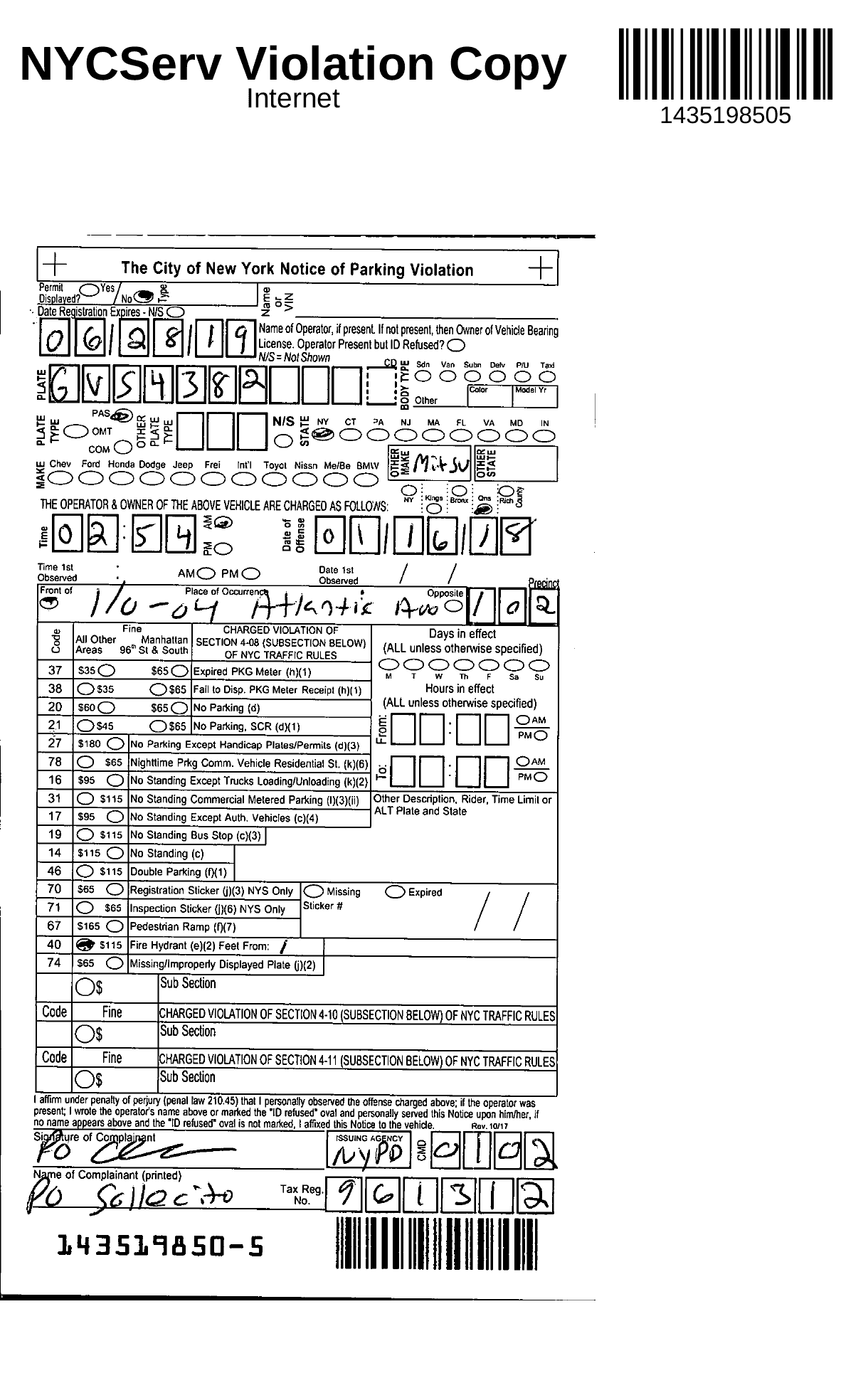
Boxes are clickable. The same fields are keyboard-accessible in the panel on the right.
Run the field analysis to populate the 58-field map for this document.
How Template Intelligence works
The frontier model is the template author, not the per-document worker. AI proposes the field map once; a human verifies it once; every subsequent document runs deterministically.
1. Register
The scan is aligned to its form template — here, the NYC Notice of Parking Violation, rev 10/17 — using the barcode and form borders as anchors. Skew, offset, broken lines, and photocopier noise stop mattering, because nothing is re-detected per document.
2. Segment from the template
All 58 field regions come from the template's field map, proposed by a vision model the first time this form type was seen and verified by a human once. Every future document of this type reuses the same map.
3. Extract per field type
Each field gets the right tool: handwritten digit boxes are read cell by cell, fill-in ovals are classified by measured ink density, handwriting crops go to a vision model scoped to just that region, and barcodes are decoded and cross-checked against each other.
4. Verify with confidence gates
Every extraction carries a confidence score and human-readable evidence. Fields below the threshold route to a human reviewer with the source crop beside them. On this document, exactly one field needed review.
5. Compose the accessible output
Tags, reading order, and narration rules come from the template — designed once by a person who understands the document, then applied consistently. A blind reader hears the charged violation, not a wall of unlabeled table cells.
The compounding advantage
Courts and agencies run on standardized forms. The first document of a new type takes minutes to template; every one after that processes in seconds for pennies — deterministic, auditable, and reviewable. The template library becomes an asset that grows with every customer.
Have documents like this?
Court records, citations, intake forms, medical charts — if it is scanned, dense, and legally meaningful, this is the pipeline built for it.